2 Get started with positron
Positron’s core layout components
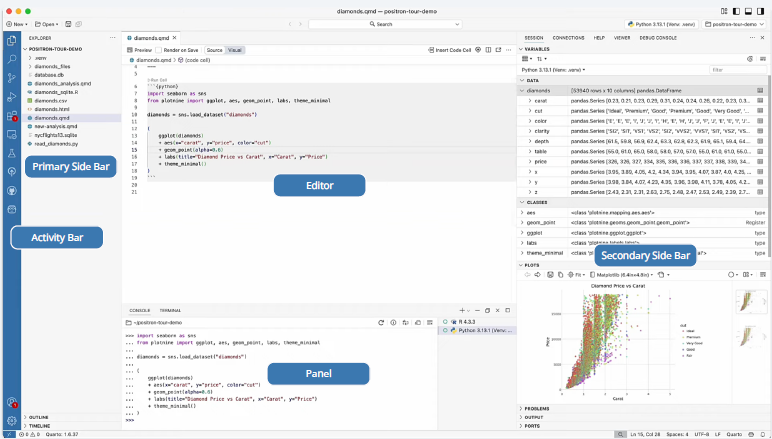
The overall layout is pretty close to the one of RStudio, with a mix of Visual Studio Code (VS Code). Positron introduces the Activity Bar and Primary Side Bar for accessing features like file exploration, search, and Git control, replacing many specialized RStudio panes and buttons.
Positron’s UI has 5 components :
Activity Bar:
Access the Explorer
Search
Source Control
Extensions
Other views
Primary Side Bar: Shows different views depending on what you have chosen in the Activity Bar
- When the Explorer is chosen, the Primary Side Bar provides a file explorer
Editor: Where you write your code
Panel: Contains the Console and Terminal
Secondary Side Bar: Explore variables, view plots, access documentation, and more
Positron also provides an AI Assistance: Positron Assistant & Databot
One of Positron’s most innovative features is the Positron Assistant, a native Generative AI client. This AI assistant is more than just a coding chatbot; it is context-aware and can access information from your console, variables, and plots. It can help you with:
Generating code: Writing boilerplate code or suggesting functions for a given task.
Debugging code: Identifying and explaining errors in your code.
Understanding code: Explaining the syntax and purpose of your code. Positron also includes Databot, an exploratory data analysis agent who acts like a research assistant that explores and visualizes data, then recommends next steps.
To download positron, let’s go to posit website : https://positron.posit.co/